MacBook Fan Running Loud? Here’s What It Means
A MacBook fan noisy problem is one of the most common complaints we see at our branches, and in most cases it is not a dying laptop. The fan speeds up whenever the internal temperature rises, and once dust, old thermal paste, or heavy background load push that temperature up, the fan has to work harder just to keep the system cool.
Dust Blocks the Airflow
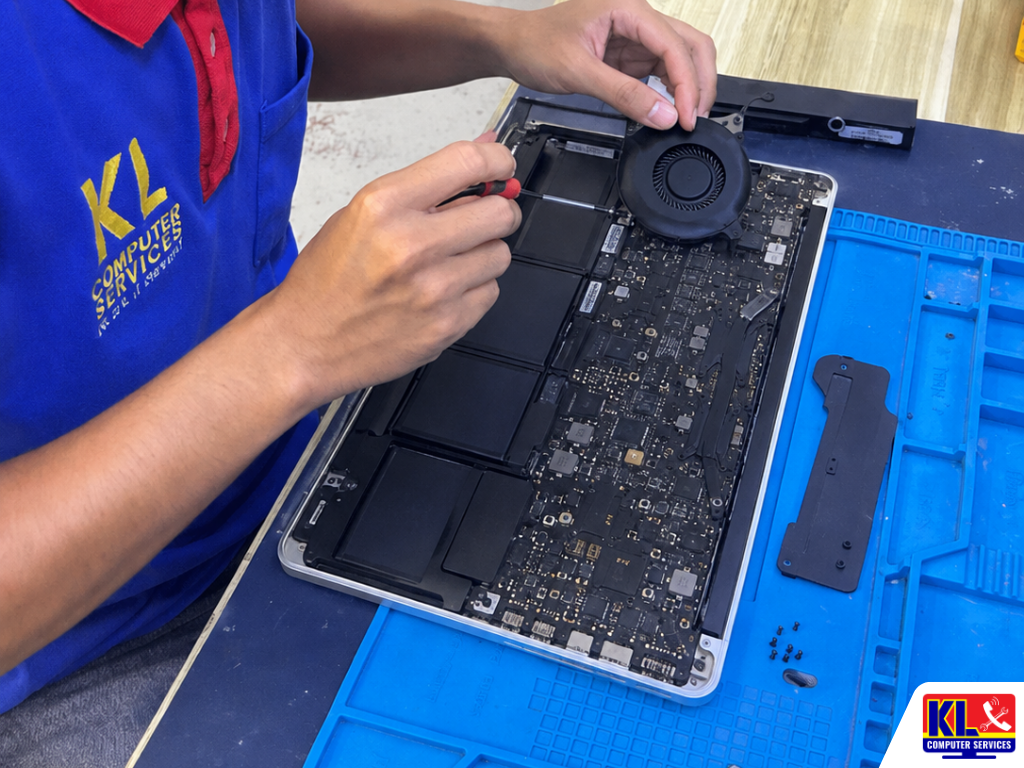
Dust and lint collect around the fan blades and vents over time, forcing the fan to spin harder to move the same amount of air.
Thermal Paste Wears Down
The paste between the processor and heatsink loses effectiveness with age, so heat builds up faster than it can be carried away.
Background Apps Spike Load
Browser tabs, updates, and background processes can quietly push CPU usage up and keep the fan running at full speed.
Fan Bearing Wear
After years of spinning, the fan’s own bearing can wear down, which shows up as a rattling or grinding noise rather than a whir.
If you’re in Setapak, Wangsa Maju, Cheras, Pandan Jaya, Ampang, Pandan Indah, Kuchai Lama or anywhere in central KL and your MacBook fan has been noisy for a while, there’s a KL Computer Services branch within reach for a same-day assessment.
💡 Quick Answer: If your MacBook fan is running loud non-stop, avoid heavy tasks and don’t close the lid while it’s still hot. WhatsApp us a short video or voice note of the noise for a quick assessment before assuming the logic board is at fault.
When This Is the Actual Cause
Not every MacBook fan noisy problem has the same trigger. These are the most common scenarios where the fan itself, or what’s making it work overtime, is the real reason behind it. See our full MacBook repair service for a complete breakdown of what we cover.
Loud Right After Waking Up
The fan jumps to full speed as soon as the MacBook wakes from sleep, even with nothing heavy running.
Fan Noise During Light Use
The fan runs loud even during simple tasks like browsing or typing, not just during heavy workloads.
Rattling or Grinding Sound
A rattling or grinding noise instead of a smooth whir, which usually points to the fan itself rather than heat alone.
Older MacBook, Rarely Cleaned
Years of daily use without ever having the internals opened up and cleaned out.
What Not to Do When the Fan Gets Loud
What you do right after noticing the noise matters more than people expect. These are the most common mistakes that turn a simple fix into a bigger repair.
- ✕Don’t keep running heavy tasks. Continuing to game, export video, or run multiple apps while the fan is already maxed out pushes the internals hotter and speeds up wear.
- ✕Don’t ignore the noise. Leaving it unresolved risks the internal temperature rising to a point where it starts affecting other components.
- ✕Don’t blow compressed air into the vents without guidance. Pushed the wrong way, it can drive dust deeper in or spin the fan blades past their safe speed.
- ✕Don’t attempt a DIY fan or thermal paste job without guidance. Opening a MacBook incorrectly can damage the logic board or nearby ribbon cables.
- ✕Don’t assume it needs a full logic board replacement. Most cases only need cleaning, a repaste, or a fan swap.
What to Do Instead
A few simple steps right after noticing the noise can significantly improve the outcome and keep repair costs down.
- ✓Ease off heavy tasks. Close demanding apps or tabs once you notice the fan running constantly.
- ✓Note when the noise happens. Whether it’s constant, only under load, or comes with a rattle helps a technician diagnose faster.
- ✓Check how long it’s been since a clean. Knowing whether the internals have ever been opened up helps assess the likely cause.
- ✓Bring it in as soon as possible. The sooner it’s checked, the lower the risk of heat affecting other components.
- ✓Get a diagnosis before any repair decision, so you know exactly what’s wrong before any work starts.
MacBook Fan Repair Service & Price
Every job starts with a transparent diagnosis. No repair work begins until you understand what’s wrong and approve the price.
| Service | What’s Included | Est. Turnaround |
|---|---|---|
| Fan Noise Diagnosis | Assessment of when and how the noise happens to confirm the exact cause | Same day |
| Internal Cleaning & Dust Removal | Opening the unit to clear dust and lint from the fan and vents | 1-3 days |
| Thermal Paste Repaste | Removing old paste and reapplying fresh compound between the processor and heatsink | 1-3 days |
| Fan Replacement | Swapping out a worn or damaged fan unit for one that’s tested and quiet | 1-3 days |
Exact repair pricing depends on the MacBook model and parts needed. WhatsApp us your issue for a clearer price estimate before you visit.
MacBook Models We Service
Fan noise issues can happen on any MacBook generation. We service and repair:
MacBook Air
Including Intel and Apple silicon models with fan or thermal noise.
MacBook Pro (Intel)
Older Intel-based Pro models, often prone to heavier fan use under load.
MacBook Pro (M-series)
Apple silicon Pro models with dust, cleaning, or fan bearing issues.
Older MacBook Models
Well used units. WhatsApp us your model to confirm.
Our 4 Branches, Get Your MacBook Checked Nearby
No matter where you are in KL, one of our branches is close by for a same-day fan noise assessment. Drop in for a walk-in assessment, no appointment needed. You can also WhatsApp us first for a faster check-in.
KL Computer Setapak
First Floor, 36-1, Jalan 2/23a, Taman Danau Kota, 53300 KL
Mon-Fri: 9am-8pm | Sat-Sun: 9am-7pm
KL Computer Jalan Klang Lama
First Floor, 2-1, Jalan Indrahana 1, Off Jalan Kuchai Lama, 58200 KL
Mon-Fri: 9am-8pm | Sat-Sun: 10am-7pm
KL Computer Cheras Pandan Jaya
First Floor, 34-1A, Jalan Pandan 2/1, Pandan Jaya, 55100 KL
Mon-Fri: 9am-7pm | Sat: 10am-7pm | Sun: Closed
KL Computer Ampang Pandan Indah
First Floor, 13M, Jalan Pandan Indah 4/2, Ampang, 55100 KL
Mon-Fri: 9am-8pm | Sat-Sun: 10am-7pm
Why Choose KL Computer Services for MacBook Fan Repair
Plenty of shops will tell you to just replace the whole logic board. Here’s what makes the difference when it’s actually a simple fix. Check our FAQ page.
- ✓Diagnosis Before Any Repair. You know exactly what’s wrong before any work begins.
- ✓1,200+ Five-Star Google Reviews. Verified, public feedback from real customers.
- ✓One of KL’s Established Independent Repair Centres. Serving Kuala Lumpur since 2012.
- ✓MacBook Specialists. Experienced technicians familiar with Intel and Apple silicon internals.
- ✓Proper Cleaning & Repaste, Not Shortcuts. Work done so the noise doesn’t come straight back.
- ✓Warranty on All Repairs. Every job backed by a warranty on both labour and parts where applicable.
How Our MacBook Fan Repair Process Works
From the moment you notice the noise to the moment you’re working in silence again, here’s what to expect:
Contact Us First
WhatsApp or call us, send a short video of the noise, and hold off on heavy tasks in the meantime.
Drop In or We Come to You
Walk into any of our 4 branches, or request an on-site technician if that’s more convenient.
Thorough Diagnosis & Your Approval
Full assessment of the noise, dust levels, and thermal condition, a clear explanation of the cause, firm quote, zero work done until you say go.
Repair & Testing
Cleaning, repaste, or fan replacement as needed, followed by a full run test before handover.
Collect with Confidence
Pick up your quiet-running MacBook along with a service receipt and tips to keep the noise from coming back.